Introduction
JDK 27 enables compact object headers by default ( JEP 534 ), which shrinks the header of every object from 96 to 64 bits and, according to the JEP, can reduce the heap size of a Java application significantly. We pay for memory when we run containers in the cloud, so this got my attention immediately.
The application under test: alf.io
alf.io is a free and open source ticketing and attendance management system for events. It covers the whole life of an event: ticket sales, attendee data, invoices, check-in and reporting.
If you’d rather not run it yourself, Swicket , run by the same people who develop alf.io, offers it as a managed service.
Under the hood, alf.io is a Spring Boot application backed by PostgreSQL, so most of what follows applies to any Spring Boot service.
Why JDK 27
The source code of the next alf.io release targets Java 25, and the application ships as a small Docker image (Alpine and a JRE built with jlink) that runs on JDK 25.
At Devoxx Belgium 2026 I met my friend Francesco (Franz) Nigro , the best performance engineer I know, and we talked about going one step further and running alf.io on JDK 27, because of compact object headers. A newer JDK can run the same jar without any change to the code: switching to JDK 27 only means changing the runtime in the image.
I learned then that we can do much more than that. So, besides the JDK, I also tried tuning the garbage collector and the heap size, and Project Leyden’s AOT cache, which should help the application reach peak performance sooner after a deployment.
Franz also told me how to measure it properly:
- warm up the application before measuring anything
- use a fixed throughput (so that all configurations do the same work in the same time)
- look at the CPU usage of the JVM’s own threads
Following his suggestion, I used Claude Code for the heavy lifting: writing and running the benchmark scripts, and analyzing the results. To read the JFR recordings it used the Jafar MCP server , which can query a recording directly.
And then Franz reviewed this post before I published it.
TL;DR: in a container with 2 CPUs and 512 MB of memory, compared to JDK 25 with a working AppCDS archive:
- Compact object headers cut the GC work and the 95th percentile latency by about 10%. JDK 25 gets the same gain if you enable them.
- Without compact object headers, JDK 27 performs like JDK 25.
- The Leyden AOT cache starts the application 24% faster. If you train it with real traffic, the 99th percentile in the first minute also drops by 31%.
- ParallelGC uses a third less CPU and answers 38% faster at the 95th percentile, and handles the same maximum load as G1. In exchange, its GC pauses are longer: 128 ms at the 99th percentile, against 45 ms for G1.
- Every configuration fills the 512 MB, and the default heap that JDK 25 picks in such a container is too small for the workload.
With 1 GB of memory and a 512 MB heap the gaps get wider. G1 on JDK 27 does half the GC work of JDK 25, and ParallelGC is 45% faster at the 95th percentile, with only 14 full collections in 8 minutes.
Two scenarios
On Kubernetes, or any other container platform, an application like alf.io runs as several small replicas, each with a hard memory limit. You pay for the limit, whatever the JVM actually uses.
I tested two sizes, both with 2 CPUs: 512 MB, which is one of the cheapest options, and 1 GB. Most of this post is about 512 MB, and the 1 GB results have their own section near the end.
A bug I didn’t know we had
While checking the container logs, I noticed this line at startup:
[cds] Dynamic archive cannot be used: static archive header checksum verification failed.
Our image generates an AppCDS archive at build time, to speed up the startup. It turns out that we have never used it.
The archive was generated with the java binary of the full JDK, but at runtime we load it with the jlink-ed JRE, which has its own base CDS archive.
The JVM detects the mismatch and silently ignores our archive.
The fix is one line: generate the archive with the runtime that will load it (/jlinked/bin/java instead of $JAVA_HOME/bin/java).
If you also enable compact object headers on JDK 25, or add modules with --add-modules, regenerate the base archive of the runtime with the same options (java -Xshare:dump). Otherwise the JVM logs a mismatch and disables part of the optimization.
If you build a custom runtime with
jlinkand use AppCDS: check your logs with-Xlog:cds. You might be in the same situation.
Every JDK 25 configuration in this benchmark has the fix.
The contenders
All the configurations run the same jar, in the same container, with the same fixed heap. Each one differs from another in a single aspect, so that I can tell which change is responsible for what:
| Name | JDK | GC | Compact headers | Startup optimization |
|---|---|---|---|---|
jdk25 | Azul Zulu 25 | G1 | no (default) | AppCDS archive |
jdk25-coh | Azul Zulu 25 | G1 | yes | AppCDS archive |
jdk27-nocoh | Temurin 27 | G1 | no | none |
jdk27 | Temurin 27 | G1 | yes (default) | none |
jdk27-aot | Temurin 27 | G1 | yes | AOT cache, trained at startup |
jdk27-aot-workload | Temurin 27 | G1 | yes | AOT cache, trained with traffic |
jdk27-parallel-aot | Temurin 27 | ParallelGC | yes | AOT cache, trained at startup |
jdk27-parallel-aot-nr3 | Temurin 27 | ParallelGC, -XX:NewRatio=3 | yes | AOT cache, trained at startup |
The JDK versions are 25.0.4.1+1-LTS and 27+35. Azul doesn’t publish an Alpine image for JDK 27 yet, so the JDK 27 images use Temurin.
-XX:NewRatio=3 was Franz’s suggestion to make the full collections of ParallelGC less frequent: it gives the old generation three quarters of the heap, instead of two thirds.
Choosing the heap
In a container with 2 CPUs and 512 MB, JDK 25 doesn’t consider the machine “server class”, so it picks SerialGC and a maximum heap of 128 MB (25% of the memory). JDK 27 picks G1 everywhere ( JEP 523 ), still with a 128 MB heap.
With the defaults of JDK 25, between 17% and 27% of the requests failed under the benchmark workload.
I then tried 160, 192 and 256 MB on JDK 27 with G1. The smaller heaps spent their time in full collections, even though the live data is only about 50 MB: the attendee export and the PDF generation allocate large, short-lived objects, and they need room.
256 MB was the clear winner, so all the configurations run with -Xms256m -Xmx256m and an explicit GC.
The other half of the container goes to everything else the JVM needs: class metadata, compiled code, GC structures, threads.
The Leyden AOT cache
Project Leyden’s AOT cache arrived with JDK 24 (
JEP 483
) and has grown with every release since.
On JDK 27 it holds the classes, already loaded and linked, the method profiles collected during the training run (
JEP 515
), and some compiled code (adapters and stubs).
Since JDK 25 you can create it in a single step with -XX:AOTCacheOutput (
JEP 514
).
Spring Boot makes the training easy: with -Dspring.context.exit=onRefresh, the application starts the context and exits right away.
Our app-cds profile, which we already had for AppCDS, lets the application start without a database. This is the training step in the build stage of the Dockerfile:
ARG JVM_OPTS="-XX:+UseG1GC"
ARG TRAIN_OPTS="-Xmx256m -XX:ActiveProcessorCount=2"
# [...]
RUN /jlinked/bin/java $JVM_OPTS $TRAIN_OPTS \
        --add-modules jdk.jfr \
        -XX:AOTCacheOutput=alfio.aot \
        -Dspring.profiles.active=app-cds \
        -Dspring.context.exit=onRefresh \
        -jar alfio-boot.jar
The runtime image uses the same JVM options by default, and loads the cache:
FROM alpine:3.24
ARG JVM_OPTS
ENV ALFIO_JVM_OPTS="${JVM_OPTS}"
# [...]
CMD /opt/jdk/bin/java $ALFIO_JVM_OPTS $ALFIO_JAVA_OPTS \
    $ALFIO_PERFORMANCE_OPTS \
    --add-modules jdk.jfr -XX:AOTCache=alfio.aot \
    -jar alfio-boot.jar
Each flag in the training command is there for a reason:
| Flag | Why |
|---|---|
/jlinked/bin/java | the cache must be created by the runtime that will load it, as for AppCDS |
--add-modules jdk.jfr | trap 1: JFR |
-Xmx256m | trap 2: compressed oops |
$JVM_OPTS | trap 3: the garbage collector |
-XX:ActiveProcessorCount=2 | the training JVM sees the same number of CPUs as the container, and makes the same choices |
Trap 1: JFR disables the cache
The JVM uses the cache only if the runtime matches the training run, and that includes the set of modules.
Starting a recording with -XX:StartFlightRecording adds the jdk.jfr module, so the JVM disables the full module graph, and the AOT cache with it.
By default (-XX:AOTMode=auto) this happens silently: the application starts, just slower.
I noticed it only because the startup time with JFR enabled was the same as without the cache.
The fix is to add jdk.jfr explicitly, with --add-modules jdk.jfr, both in the training run and at runtime.
The mismatch works in both directions: a JVM started without JFR can’t use a cache trained with it.
Trap 2: compressed oops
An oop ( ordinary object pointer ) is what HotSpot calls a reference to a Java object. On a 64-bit JVM, if the heap is smaller than 32 GB, the JVM stores these references in 32 bits instead of 64 to save memory: these are the compressed oops. How it encodes them depends on the size of the heap.
My build machine has much more memory than a container, so during docker build the JVM picked a large default heap, and with it a different compressed oops encoding than the one used at runtime.
The cached code depends on that encoding, so the JVM threw it away at runtime, while still using the rest of the cache.
Training with the production heap fixes it.
Trap 3: the cached code is GC-specific
When I switched to ParallelGC, the cache trained with G1 lost 911 code entries. The code is compiled for a specific garbage collector, so the GC of the training run must match the one used at runtime.
That’s why JVM_OPTS is a build argument, used both for the training and as default value for ALFIO_JVM_OPTS. You can still pick another GC at runtime; you lose the cached code and keep the rest.
For the benchmark I started every container with
-XX:AOTMode=on, which makes the JVM fail at startup if it can’t use the cache. I recommend it whenever you measure something with an AOT cache: without it, the only sign of an ignored cache is a slower application.In production, Franz suggests keeping
-Xlog:aotenabled and alerting on the “cannot be used” lines: the production CPUs can differ from the build host, and a mismatch silently drops the cached code.
Training with real traffic
A cache trained at startup knows nothing about the code that runs when somebody buys a ticket.
For the jdk27-aot-workload image I started the jdk27-aot image with -XX:AOTCacheOutput, sent 5 minutes of traffic at 4 journeys per second, and stopped the container.
The JVM writes the cache on exit, and a small Dockerfile copies it on top of the image.
The training traffic is generated with a different seed than the measured runs: same kind of requests, different sequence. Otherwise the cache would have known the test in advance.
The cache grows from 102 MB to 150 MB. Doing this in a CI pipeline means starting a database and generating traffic during the build, which our pipeline doesn’t do today.
How I measured
The workload
The load generator is a Gatling simulation. It follows an open model: new visitors arrive at a fixed rate, whether the server is fast or slow, so the throughput is the same for all configurations.
Every arrival is a “journey”, which makes about 22 HTTP requests on average:
- three anonymous visits to the event page: the server-rendered page and the API calls of our frontend
- a purchase: the buyer reserves 1 to 4 tickets, fills in the attendee data and confirms with bank transfer or on-site payment. 10% of the carts are abandoned, 30% of the buyers ask for an invoice.
Admin API calls run alongside: event statistics, and a full export of the attendees.
Every random choice is derived from the journey index, so every run sends exactly the same requests.
Each run starts from a fresh copy of a database with a published event of 50,000 seats.
The machine
All the tests ran on my laptop:
- Lenovo ThinkPad X1 Carbon Gen 12, 32 GB of RAM, Ubuntu 26.04, Docker 29.9
- Intel Core Ultra 7 155U: 2 performance cores with Hyper-Threading, 8 efficiency cores and 2 low-power efficiency cores
Every component has its own CPUs, pinned with --cpuset-cpus and taskset:
- alf.io gets the two hardware threads of one performance core, so the JVM sees 2 CPUs
- PostgreSQL gets the other performance core
- Gatling runs on the efficiency cores
A laptop CPU changes its frequency all the time, and a configuration that uses less CPU would run at a higher clock, making it look even better.
So I capped the frequency at 3.0 GHz with the performance governor, and kept the laptop on AC power.
A small script sampled the clock during every run: it averaged between 2.9 and 3.0 GHz, for every configuration.
Finding the rate
Franz’s rule: measure at 80% of the maximum load of the slowest configuration.
To find the maximum, a script warms up the application for 4 minutes, then runs probes of increasing rate (30 seconds of ramp-up, 2 minutes at constant rate) until the 95th percentile goes above 500 ms or more than 1% of the requests fail. Then it narrows down the limit, in steps of a quarter of a journey per second.
| Configuration | Maximum rate |
|---|---|
jdk25 | 7.0 journeys/s (about 150 requests/s) |
jdk27-aot | 7.5 journeys/s (about 160 requests/s) |
jdk27-parallel-aot | 7.5 journeys/s |
jdk27-parallel-aot-nr3 | 7.5 journeys/s |
The measured runs therefore use 5.6 journeys per second, about 122 HTTP requests per second.
A run
- Start the container: 2 dedicated CPUs, the memory limit of the scenario, GC log
- 30 seconds idle
- 2 minutes of ramp-up, from 10% to 100% of the rate
- 3 minutes at constant rate: the warm-up
- 8 minutes at constant rate: the measurement
- Force a full GC with
jcmd, to measure the live data in the same way for every GC - 60 seconds idle, then stop the container
During the run, pidstat -t records the CPU usage of every thread of the JVM, which I grouped by component: GC threads, JIT compiler threads, Jetty threads, scheduled jobs, and so on.
A sampler reads the memory of the container from its cgroup, split into anonymous memory (heap, metaspace, compiled code…) and file-backed memory (page cache, including the mapped AOT cache, which the kernel can reclaim).
I ran each configuration twice, alternated, so that any drift of my machine affects all of them. The runs are very consistent: within a configuration, the 95th percentile differs by 3 ms at most. All 16 runs sent 88,285 requests, without a single error or out-of-memory kill.
JFR and Native Memory Tracking are not free: on JDK 25, JFR’s own buffers took 145 MB. So the numbers I compare come from runs without them, and I used one extra run per configuration, with JFR and NMT in a 1 GB container, only to explain them.
The tables below show the medians. The values of every run, the capacity probes, the native memory of each configuration and the JIT statistics are in the detailed results .
Startup
From docker run to the first successful health check:
| Configuration | Startup |
|---|---|
jdk25 (AppCDS) | 7.1 s |
jdk27 (no archive) | 9.3 s |
jdk27-aot | 5.4 s |
jdk27-aot-workload | 5.1 s |
jdk27-parallel-aot | 5.2 s |
The AOT cache is 24% faster than a working AppCDS archive, 28% if trained with traffic. JDK 27 without any archive is the slowest of all, about two seconds behind JDK 25 with its AppCDS archive. That’s roughly what the one-line fix gives our next release for free.
Warm-up
During the first minutes the JIT compiler is busy, and the latency is higher than at steady state. With 2 CPUs, the JVM starts a single C2 compiler thread: while it compiles a method, every other method waits in the queue.
| First 5 minutes | jdk25 | jdk27 | jdk27-aot | jdk27-aot-workload |
|---|---|---|---|---|
| JIT threads CPU | 29% | 33% | 33% | 26% |
| p95, first minute | 62 ms | 59 ms | 55 ms | 45 ms |
| p99, first minute | 145 ms | 139 ms | 132 ms | 100 ms |
| p99, whole warm-up | 163 ms | 151 ms | 151 ms | 126 ms |
CPU is the percentage of one CPU, measured with pidstat.
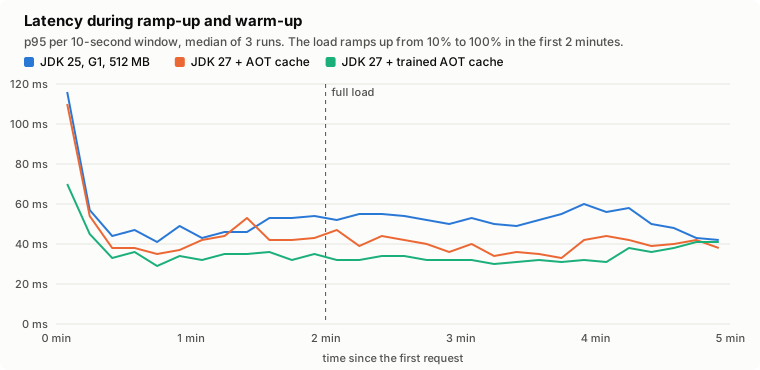
The cache trained at startup does nothing for the JIT: its compiler threads work as hard as on JDK 27 without a cache. The small gain in latency comes from compact object headers, as we’ll see.
The cache trained with traffic is a different story. The JVM already has the profiles of the methods that handle a purchase: it needs 19% fewer compilations during the warm-up, and its compiler threads use 10% less CPU than on JDK 25 (20% less than JDK 27 without a cache). The 99th percentile in the first minute drops from 145 to 100 ms.
I measure the JIT work as the CPU time of the compiler threads, not with the compilation times recorded by JFR. Those are wall-clock times: when the CPUs are busy, a compilation takes longer without doing more work.
Steady state
jdk25 | jdk25-coh | jdk27-nocoh | jdk27 | jdk27-aot | jdk27-aot-workload | jdk27-parallel-aot | |
|---|---|---|---|---|---|---|---|
| p50 | 12 ms | 10.5 ms | 12 ms | 10 ms | 10.5 ms | 10 ms | 8 ms |
| p95 | 74 ms | 67 ms | 74.5 ms | 65.5 ms | 66.5 ms | 61.5 ms | 45.5 ms |
| p99 | 147 ms | 133.5 ms | 150.5 ms | 130 ms | 133.5 ms | 124.5 ms | 105 ms |
| JVM CPU | 121% | 115% | 123% | 114% | 115% | 112% | 81% |
| GC threads CPU | 43% | 39% | 44% | 37% | 38% | 36% | 16% |
| Live data | 50 MB | 45 MB | 51 MB | 47 MB | 48 MB | 47 MB | 46 MB |
Medians of two runs, during the 8 minutes of measurement.
Compact object headers
Look at the first four columns: they are two pairs, with and without compact object headers, on JDK 25 and on JDK 27.
jdk25-cohis better thanjdk25by about 10%: GC threads CPU, 95th and 99th percentile.jdk27-nocohis as good asjdk25, andjdk27as good asjdk25-coh.
So, for this application, almost all the steady-state gain of JDK 27 comes from compact object headers, and you can already have it on JDK 25 with -XX:+UseCompactObjectHeaders (
JEP 519
).
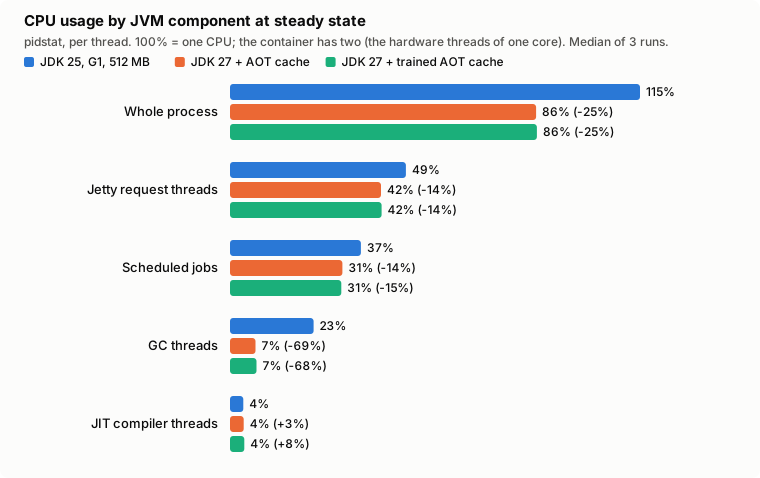
The live data shrinks by 9%, from 50 to 45 MB. That’s less than I expected, but alf.io keeps very little in memory: most of its objects live for the duration of a request. The headers make those objects smaller too, so the heap fills up more slowly: 11% fewer young collections, and less GC work.
G1 or ParallelGC?
ParallelGC is the clear winner in CPU: the JVM uses 81% of a CPU instead of 115%, and the GC threads 16% instead of 38%. ParallelGC does all its work during the pauses, while G1 also runs concurrent threads alongside the application. The application threads also need about 16% less CPU, both Jetty’s request threads and the scheduled jobs. My guess is that this comes from the write barrier: G1 runs extra code on every write to an object field, and ParallelGC much less. I haven’t measured it for now; it might be the subject of a follow-up post.
The latency follows, at every percentile.
The price is in the pauses:
| GC pauses, 8 minutes | jdk27-aot (G1) | jdk27-parallel-aot | jdk27-parallel-aot-nr3 |
|---|---|---|---|
| Full collections | 8 | 119 | 99 |
| p99 pause | 44 ms | 128 ms | 126 ms |
| Longest pause | 138 ms | 174 ms | 151 ms |
| Total time in pauses | 46 s | 41 s | 49 s |
With a 256 MB heap, ParallelGC runs a full collection every 4 seconds, and each one takes more than 100 ms. G1 isn’t immune either: it also runs a few full collections, probably for the large allocations of the attendee export.
Franz suggested checking the trade-off near saturation too, not only at 80% of the load. ParallelGC doesn’t lose anything there: both GCs reach 7.5 journeys per second, and at that rate ParallelGC still has a 95th percentile of 119 ms, where G1 is at 362 ms. Even the slowest requests are faster with ParallelGC: 374 ms against 463 ms at steady state.
-XX:NewRatio=3 doesn’t help: the full collections are a bit less frequent, but a smaller young generation means 47% more young collections, and slightly more CPU in total.
Memory
This is where I expected the biggest change, and where the 512 MB container hides it.
Every configuration fills the container: the cgroup reaches 512 MB in every run, with about 490 MB of anonymous memory. The JVM doesn’t need all of it, but nothing pushes it back: the heap is fixed, and the code cache and the metaspace grow until the kernel starts reclaiming the page cache, which drops to 1-4 MB. None of the runs was killed.
The NMT data of the extra runs shows where the memory outside the heap goes (committed memory, without the memory of JFR and NMT themselves):
jdk25 | jdk27-aot | jdk27-parallel-aot | |
|---|---|---|---|
| Class data (AppCDS archive / AOT cache) | 83 MB | 92 MB | 91 MB |
| Compiled code | 92 MB | 77 MB | 86 MB |
| GC structures | 44 MB | 43 MB | 11 MB |
| Metaspace and class space | 52 MB | 49 MB | 51 MB |
| Everything else | 13 MB | 11 MB | 11 MB |
| Total outside the heap | 284 MB | 272 MB | 250 MB |
G1 needs about 33 MB more than ParallelGC for its own data structures. Compact object headers save some heap, but with a fixed heap that doesn’t make the container smaller: it means less work for the GC, as we saw above.
With a 512 MB limit, the useful question is how much of that memory goes into GC work and how much into the application, and that’s where JDK 27 and ParallelGC do better.
Scenario 2: a container with 1 GB
The second scenario is the same container with twice the memory. It has 2 CPUs, 1 GB and a 512 MB heap (half the limit, as before), and PostgreSQL runs on its own CPUs. I only kept the baseline, the best G1 configuration and ParallelGC.
jdk25 | jdk27-aot-workload | jdk27-parallel-aot | |
|---|---|---|---|
| Maximum rate | 8.0 journeys/s | 7.75 journeys/s | 8.25 journeys/s |
| p95 | 71 ms | 55 ms | 39 ms |
| p99 | 150 ms | 112 ms | 80 ms |
| JVM CPU | 123% | 99% | 75% |
| GC threads CPU | 40% | 20% | 5% |
| Longest GC pause | 50 ms | 54 ms | 141 ms |
| Peak memory | 885 MB | 933 MB | 880 MB |
These are medians of three runs at 6.2 journeys/s (about 135 requests/s), 80% of the slowest maximum. The frequency sampler wasn’t recording during the first two runs of each configuration, so I ran a third one with it on. It matches the other two.
With 1 GB the container doesn’t fill up anymore. All three configurations peak between 880 and 930 MB, and about 790 MB of that is anonymous memory: the 512 MB heap plus the roughly 280 MB outside the heap we saw in the first scenario.
jdk27-aot-workload uses 50 MB more because the AOT cache file is mapped in memory, and the kernel can reclaim that.
All three handle about the same maximum load, within one step of the search.
ParallelGC benefits the most from the bigger heap. In 8 minutes it runs 14 full collections instead of about 120, and its GC threads use 5% of a CPU. Its longest pause is still 141 ms.
I didn’t expect G1’s result. With 256 MB, JDK 27 saved 12-16% of the GC work of JDK 25; with 512 MB it saves half.
According to the GC logs, large allocations are behind it. With this heap G1 uses 1 MB regions, so any object of 512 KB or more is humongous. It goes straight to the old generation, and G1 may start a new GC cycle because of it.
In the last 10 minutes of a run, JDK 25 starts one about 1,270 times. JDK 27 starts between 500 and 1,000, with a lot of variation between runs.
I don’t know yet which change in G1 explains this. I also didn’t run jdk25-coh here, so I can’t say how much compact object headers contribute.
A larger region size might fix it on both JDKs, and I’ll try that in the follow-up post.
Conclusion
I started from a promise of a significantly lower memory usage. In a 512 MB container I couldn’t see it: every configuration fills the container. With 1 GB there’s room to spare, but both JDKs use the same amount of memory, because the heap is fixed and everything else is about the same size. Compact object headers show up as less garbage collection work instead, and as lower latency.
What I learned along the way:
- Build a fair baseline before comparing anything. My first comparison credited JDK 27 with gains that came from a broken AppCDS archive, from compact object headers and from ParallelGC.
- Compact object headers are the main reason to move to JDK 27, and you can already try them on JDK 25.
- Set the heap size and the GC explicitly in small containers. The defaults give you a heap that’s too small.
- Check that your startup optimizations are actually used. Our AppCDS archive never was, and the JVM can silently drop the AOT cache because of JFR, the compressed oops encoding or the garbage collector. Use
-XX:AOTMode=onwhile testing. - If warm-up matters to you, train the AOT cache with real traffic. A cache trained at startup helps the startup, and not much else.
- ParallelGC fits a small heap on 2 CPUs well, as long as you can live with pauses of 100-200 ms. With a bigger heap, full collections become rare.
- Measure CPU time, not wall-clock time, when you compare the work of the JIT.
A benchmark on my laptop is still a benchmark on my laptop, though: the real test will be production.
The benchmark suite is on GitHub . I’d recommend running something like it before trusting any performance claim, including mine. Measure, don’t guess!